 06f1fd69a6
10 KiB
AWQ
Activation-aware Weight Quantization (AWQ) preserves a small fraction of the weights that are important for LLM performance to compress a model to 4-bits with minimal performance degradation.
There are several libraries for quantizing models with the AWQ algorithm, such as llm-awq, autoawq or optimum-intel. Transformers supports loading models quantized with the llm-awq and autoawq libraries. This guide will show you how to load models quantized with autoawq, but the process is similar for llm-awq quantized models.
Run the command below to install autoawq
pip install autoawq
Warning
AutoAWQ downgrades Transformers to version 4.47.1. If you want to do inference with AutoAWQ, you may need to reinstall your Transformers' version after installing AutoAWQ.
Identify an AWQ-quantized model by checking the quant_method key in the models config.json file.
{
  "_name_or_path": "/workspace/process/huggingfaceh4_zephyr-7b-alpha/source",
  "architectures": [
    "MistralForCausalLM"
  ],
  ...
  ...
  ...
  "quantization_config": {
    "quant_method": "awq",
    "zero_point": true,
    "group_size": 128,
    "bits": 4,
    "version": "gemm"
  }
}
Load the AWQ-quantized model with [~PreTrainedModel.from_pretrained]. This automatically sets the other weights to fp16 by default for performance reasons. Use the dtype parameter to load these other weights in a different format.
If the model is loaded on the CPU, use the device_map parameter to move it to an accelerator.
from transformers import AutoModelForCausalLM, AutoTokenizer
from accelerate import Accelerator
import torch

device = Accelerator().device

model = AutoModelForCausalLM.from_pretrained(
  "TheBloke/zephyr-7B-alpha-AWQ",
  dtype=torch.float32,
  device_map=device
)
Use attn_implementation to enable FlashAttention2 to further accelerate inference.
from transformers import AutoModelForCausalLM, AutoTokenizer

model = AutoModelForCausalLM.from_pretrained(
  "TheBloke/zephyr-7B-alpha-AWQ",
  attn_implementation="flash_attention_2",
  device_map="cuda:0"
)
Fused modules
Fused modules offer improved accuracy and performance. They are supported out-of-the-box for AWQ modules for Llama and Mistral architectures, but you can also fuse AWQ modules for unsupported architectures.
Warning
Fused modules cannot be combined with other optimization techniques such as FlashAttention2.
Create an [AwqConfig] and set the parameters fuse_max_seq_len and do_fuse=True to enable fused modules. The fuse_max_seq_len parameter is the total sequence length and it should include the context length and the expected generation length. Set it to a larger value to be safe.
The example below fuses the AWQ modules of the TheBloke/Mistral-7B-OpenOrca-AWQ model.
import torch
from transformers import AwqConfig, AutoModelForCausalLM

quantization_config = AwqConfig(
    bits=4,
    fuse_max_seq_len=512,
    do_fuse=True,
)
model = AutoModelForCausalLM.from_pretrained(
  "TheBloke/Mistral-7B-OpenOrca-AWQ",
  quantization_config=quantization_config
).to(0)
The TheBloke/Mistral-7B-OpenOrca-AWQ model was benchmarked with batch_size=1 with and without fused modules.
| Batch Size | Prefill Length | Decode Length | Prefill tokens/s | Decode tokens/s | Memory (VRAM) |
|---|---|---|---|---|---|
| 1 | 32 | 32 | 60.0984 | 38.4537 | 4.50 GB (5.68%) |
| 1 | 64 | 64 | 1333.67 | 31.6604 | 4.50 GB (5.68%) |
| 1 | 128 | 128 | 2434.06 | 31.6272 | 4.50 GB (5.68%) |
| 1 | 256 | 256 | 3072.26 | 38.1731 | 4.50 GB (5.68%) |
| 1 | 512 | 512 | 3184.74 | 31.6819 | 4.59 GB (5.80%) |
| 1 | 1024 | 1024 | 3148.18 | 36.8031 | 4.81 GB (6.07%) |
| 1 | 2048 | 2048 | 2927.33 | 35.2676 | 5.73 GB (7.23%) |
| Batch Size | Prefill Length | Decode Length | Prefill tokens/s | Decode tokens/s | Memory (VRAM) |
|---|---|---|---|---|---|
| 1 | 32 | 32 | 81.4899 | 80.2569 | 4.00 GB (5.05%) |
| 1 | 64 | 64 | 1756.1 | 106.26 | 4.00 GB (5.05%) |
| 1 | 128 | 128 | 2479.32 | 105.631 | 4.00 GB (5.06%) |
| 1 | 256 | 256 | 1813.6 | 85.7485 | 4.01 GB (5.06%) |
| 1 | 512 | 512 | 2848.9 | 97.701 | 4.11 GB (5.19%) |
| 1 | 1024 | 1024 | 3044.35 | 87.7323 | 4.41 GB (5.57%) |
| 1 | 2048 | 2048 | 2715.11 | 89.4709 | 5.57 GB (7.04%) |
The speed and throughput of fused and unfused modules were also tested with the optimum-benchmark library.
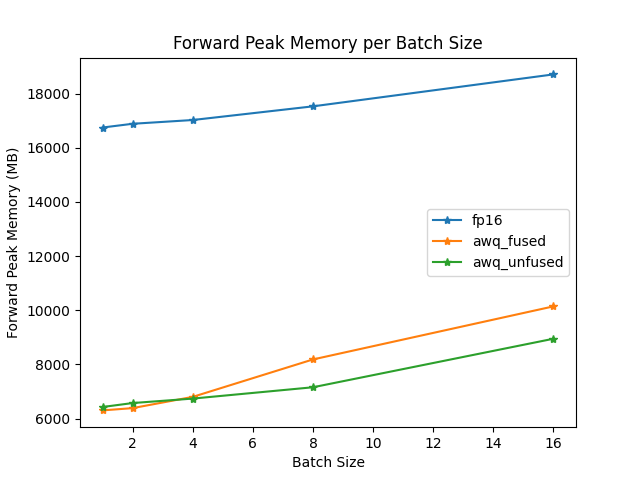
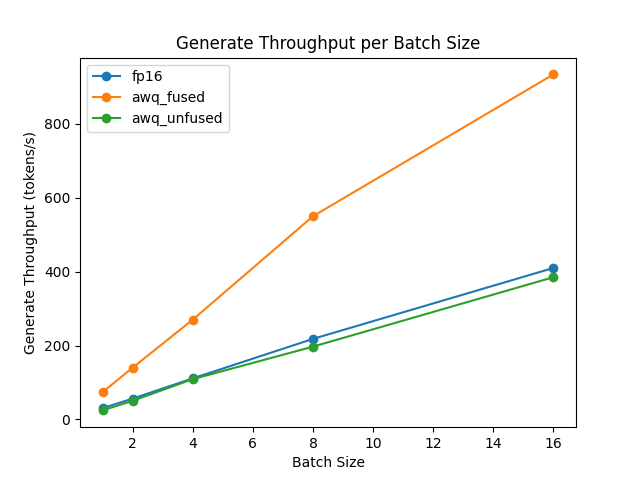
For architectures that don't support fused modules, create an [AwqConfig] and define a custom fusing mapping in modules_to_fuse to determine which modules need to be fused.
The example below fuses the AWQ modules of the TheBloke/Yi-34B-AWQ model.
import torch
from transformers import AwqConfig, AutoModelForCausalLM

quantization_config = AwqConfig(
    bits=4,
    fuse_max_seq_len=512,
    modules_to_fuse={
        "attention": ["q_proj", "k_proj", "v_proj", "o_proj"],
        "layernorm": ["ln1", "ln2", "norm"],
        "mlp": ["gate_proj", "up_proj", "down_proj"],
        "use_alibi": False,
        "num_attention_heads": 56,
        "num_key_value_heads": 8,
        "hidden_size": 7168
    }
)

model = AutoModelForCausalLM.from_pretrained(
  "TheBloke/Yi-34B-AWQ",
  quantization_config=quantization_config
).to(0)
The parameter modules_to_fuse should include the following keys.
-
"attention": The names of the attention layers to fuse in the following order: query, key, value and output projection layer. If you don't want to fuse these layers, pass an empty list. -
"layernorm": The names of all the LayerNorm layers you want to replace with a custom fused LayerNorm. If you don't want to fuse these layers, pass an empty list. -
"mlp": The names of the MLP layers you want to fuse into a single MLP layer in the order: (gate (dense, layer, post-attention) / up / down layers). -
"use_alibi": If your model uses ALiBi positional embedding. -
"num_attention_heads": The number of attention heads. -
"num_key_value_heads": The number of key value heads that should be used to implement Grouped Query Attention (GQA).parameter value attention num_key_value_heads=num_attention_headsMulti-Head Attention num_key_value_heads=1Multi-Query Attention num_key_value_heads=...Grouped Query Attention -
"hidden_size": The dimension of the hidden representations.
ExLlamaV2
ExLlamaV2 kernels support faster prefill and decoding. Run the command below to install the latest version of autoawq with ExLlamaV2 support.
pip install git+https://github.com/casper-hansen/AutoAWQ.git
Set version="exllama" in [AwqConfig] to enable ExLlamaV2 kernels.
Tip
ExLlamaV2 is supported on AMD GPUs.
import torch
from transformers import AutoModelForCausalLM, AutoTokenizer, AwqConfig

quantization_config = AwqConfig(version="exllama")

model = AutoModelForCausalLM.from_pretrained(
    "TheBloke/Mistral-7B-Instruct-v0.1-AWQ",
    quantization_config=quantization_config,
    device_map="auto",
)
Resources
Run the AWQ demo notebook for more examples of how to quantize a model, push a quantized model to the Hub, and more.