Files
transformers/docs/source/ja/tasks/zero_shot_image_classification.md
陈赣 06f1fd69a6
Some checks failed
Self-hosted runner (nightly-past-ci-caller) / Get number (push) Has been cancelled
Self-hosted runner (nightly-past-ci-caller) / TensorFlow 2.11 (push) Has been cancelled
Self-hosted runner (nightly-past-ci-caller) / TensorFlow 2.10 (push) Has been cancelled
Self-hosted runner (nightly-past-ci-caller) / TensorFlow 2.9 (push) Has been cancelled
Self-hosted runner (nightly-past-ci-caller) / TensorFlow 2.8 (push) Has been cancelled
Self-hosted runner (nightly-past-ci-caller) / TensorFlow 2.7 (push) Has been cancelled
Self-hosted runner (nightly-past-ci-caller) / TensorFlow 2.6 (push) Has been cancelled
Self-hosted runner (nightly-past-ci-caller) / TensorFlow 2.5 (push) Has been cancelled
Self-hosted runner (benchmark) / Benchmark (aws-g5-4xlarge-cache) (push) Has been cancelled
Build documentation / build (push) Has been cancelled
Build documentation / build_other_lang (push) Has been cancelled
CodeQL Security Analysis / CodeQL Analysis (push) Has been cancelled
New model PR merged notification / Notify new model (push) Has been cancelled
PR CI / pr-ci (push) Has been cancelled
Slow tests on important models (on Push - A10) / Get all modified files (push) Has been cancelled
Secret Leaks / trufflehog (push) Has been cancelled
Update Transformers metadata / build_and_package (push) Has been cancelled
Slow tests on important models (on Push - A10) / Model CI (push) Has been cancelled
Check Tiny Models / Check tiny models (push) Has been cancelled
Self-hosted runner (Intel Gaudi3 scheduled CI caller) / Model CI (push) Has been cancelled
Self-hosted runner (Intel Gaudi3 scheduled CI caller) / Pipeline CI (push) Has been cancelled
Self-hosted runner (Intel Gaudi3 scheduled CI caller) / Example CI (push) Has been cancelled
Self-hosted runner (Intel Gaudi3 scheduled CI caller) / DeepSpeed CI (push) Has been cancelled
Self-hosted runner (Intel Gaudi3 scheduled CI caller) / Trainer/FSDP CI (push) Has been cancelled
Nvidia CI - Flash Attn / Setup (push) Has been cancelled
Nvidia CI - Flash Attn / Model CI (push) Has been cancelled
Nvidia CI / Setup (push) Has been cancelled
Nvidia CI / Model CI (push) Has been cancelled
Nvidia CI / Torch pipeline CI (push) Has been cancelled
Nvidia CI / Example CI (push) Has been cancelled
Nvidia CI / Trainer/FSDP CI (push) Has been cancelled
Nvidia CI / DeepSpeed CI (push) Has been cancelled
Nvidia CI / Quantization CI (push) Has been cancelled
Nvidia CI / Kernels CI (push) Has been cancelled
Doctests / Setup (push) Has been cancelled
Doctests / Call doctest jobs (push) Has been cancelled
Doctests / Send results to webhook (push) Has been cancelled
Extras Smoke Test / Get supported Python versions (push) Has been cancelled
Extras Smoke Test / Test extras on Python ${{ matrix.python-version }} (push) Has been cancelled
Extras Smoke Test / Check Slack token availability (push) Has been cancelled
Extras Smoke Test / Notify failures to Slack (push) Has been cancelled
Self-hosted runner (AMD scheduled CI caller) / Trigger Scheduled AMD CI (push) Has been cancelled
Stale Bot / Close Stale Issues (push) Has been cancelled
first commit
2026-06-05 16:53:03 +08:00

6.6 KiB

Zero-shot image classification

open-in-colab

ゼロショット画像分類は、次のモデルを使用して画像をさまざまなカテゴリに分類するタスクです。 これらの特定のカテゴリのラベル付きの例を含むデータに対して明示的にトレーニングされていない。

従来、画像分類には、ラベル付き画像の特定のセットでモデルをトレーニングする必要があり、このモデルは次のことを学習します。 特定の画像の特徴をラベルに「マッピング」します。分類タスクにそのようなモデルを使用する必要がある場合、 新しいラベルのセットでは、モデルを "再調整" するために微調整が必​​要です。

対照的に、ゼロショットまたはオープン語彙画像分類モデルは、通常、大規模なシステムでトレーニングされたマルチモーダル モデルです。 画像と関連する説明のデータセット。これらのモデルは、ゼロショット画像分類を含む多くの下流タスクに使用できる、調整された視覚言語表現を学習します。

これは、画像分類に対するより柔軟なアプローチであり、モデルを新しいまだ見たことのないカテゴリに一般化できるようになります。 追加のトレーニング データを必要とせず、ユーザーはターゲット オブジェクトの自由形式のテキスト説明を含む画像をクエリできるようになります。

このガイドでは、次の方法を学びます。

  • ゼロショット画像分類パイプラインを作成する
  • 手動でゼロショット画像分類推論を実行します

始める前に、必要なライブラリがすべてインストールされていることを確認してください。

pip install -q transformers

Zero-shot image classification pipeline

ゼロショット画像分類をサポートするモデルで推論を試す最も簡単な方法は、対応する [パイプライン] を使用することです。 Hugging Face Hub のチェックポイント からパイプラインをインスタンス化します。

>>> from transformers import pipeline

>>> checkpoint = "openai/clip-vit-large-patch14"
>>> detector = pipeline(model=checkpoint, task="zero-shot-image-classification")

次に、分類したい画像を選択します。

>>> from PIL import Image
>>> import requests

>>> url = "https://unsplash.com/photos/g8oS8-82DxI/download?ixid=MnwxMjA3fDB8MXx0b3BpY3x8SnBnNktpZGwtSGt8fHx8fDJ8fDE2NzgxMDYwODc&force=true&w=640"
>>> image = Image.open(requests.get(url, stream=True).raw)

>>> image
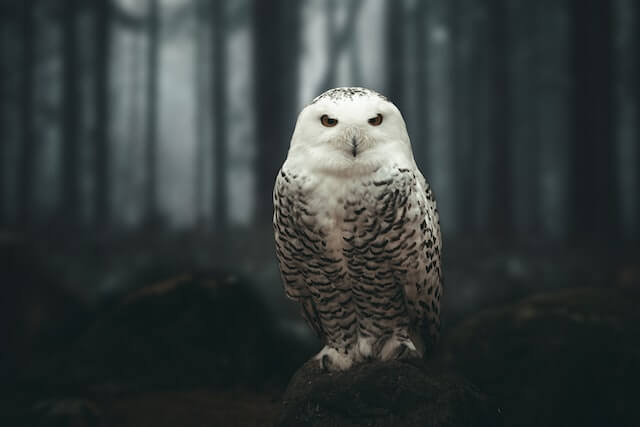
Photo of an owl

画像と候補オブジェクトのラベルをパイプラインに渡します。ここでは画像を直接渡します。他の適切なオプション 画像へのローカル パスまたは画像 URL を含めます。 候補ラベルは、この例のように単純な単語にすることも、より説明的な単語にすることもできます。

>>> predictions = detector(image, candidate_labels=["fox", "bear", "seagull", "owl"])
>>> predictions
[{'score': 0.9996670484542847, 'label': 'owl'},
 {'score': 0.000199399160919711, 'label': 'seagull'},
 {'score': 7.392891711788252e-05, 'label': 'fox'},
 {'score': 5.96074532950297e-05, 'label': 'bear'}]

Zero-shot image classification by hand

ゼロショット画像分類パイプラインの使用方法を理解したところで、ゼロショットを実行する方法を見てみましょう。 画像を手動で分類します。

まず、Hugging Face Hub のチェックポイント からモデルと関連プロセッサをロードします。 ここでは、前と同じチェックポイントを使用します。

>>> from transformers import AutoProcessor, AutoModelForZeroShotImageClassification

>>> model = AutoModelForZeroShotImageClassification.from_pretrained(checkpoint)
>>> processor = AutoProcessor.from_pretrained(checkpoint)

気分を変えて、別の画像を撮ってみましょう。

>>> from PIL import Image
>>> import requests

>>> url = "https://unsplash.com/photos/xBRQfR2bqNI/download?ixid=MnwxMjA3fDB8MXxhbGx8fHx8fHx8fHwxNjc4Mzg4ODEx&force=true&w=640"
>>> image = Image.open(requests.get(url, stream=True).raw)

>>> image

Photo of a car

プロセッサを使用してモデルの入力を準備します。プロセッサーは、 サイズ変更と正規化によるモデルの画像、およびテキスト入力を処理するトークナイザー。

>>> candidate_labels = ["tree", "car", "bike", "cat"]
>>> inputs = processor(images=image, text=candidate_labels, return_tensors="pt", padding=True)

入力をモデルに渡し、結果を後処理します。

>>> import torch

>>> with torch.no_grad():
...     outputs = model(**inputs)

>>> logits = outputs.logits_per_image[0]
>>> probs = logits.softmax(dim=-1).numpy()
>>> scores = probs.tolist()

>>> result = [
...     {"score": score, "label": candidate_label}
...     for score, candidate_label in sorted(zip(probs, candidate_labels), key=lambda x: -x[0])
... ]

>>> result
[{'score': 0.998572, 'label': 'car'},
 {'score': 0.0010570387, 'label': 'bike'},
 {'score': 0.0003393686, 'label': 'tree'},
 {'score': 3.1572064e-05, 'label': 'cat'}]