 06f1fd69a6
6.6 KiB
Backbones
Higher-level computer visions tasks, such as object detection or image segmentation, use several models together to generate a prediction. A separate model is used for the backbone, neck, and head. The backbone extracts useful features from an input image into a feature map, the neck combines and processes the feature maps, and the head uses them to make a prediction.
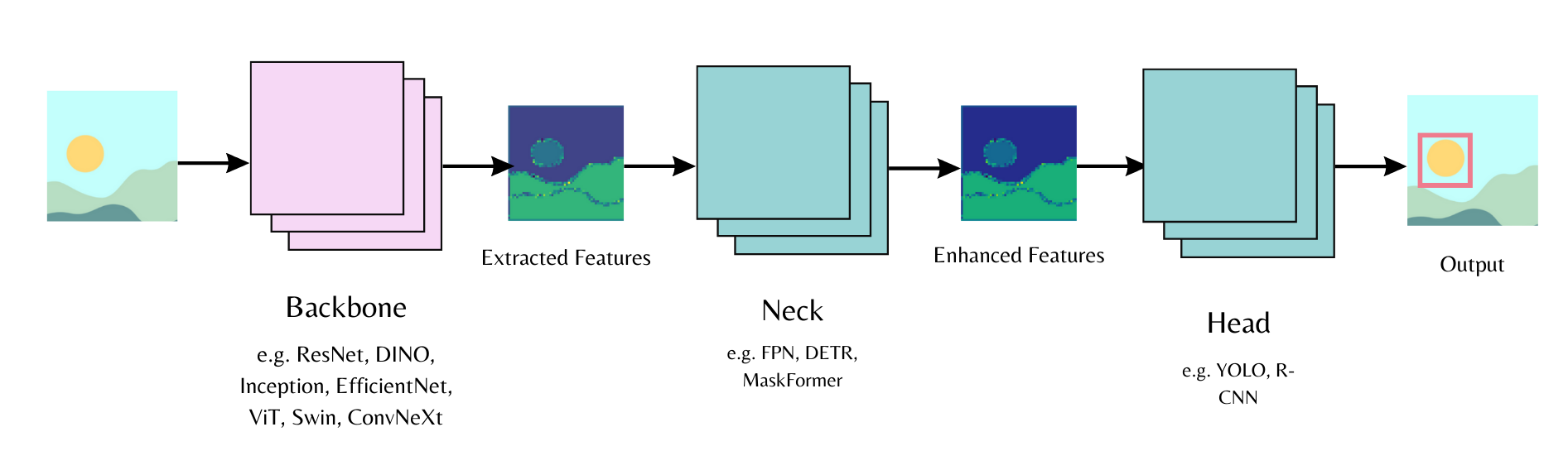
Load a backbone with [~PreTrainedConfig.from_pretrained] and use the out_indices parameter to determine which layer, given by the index, to extract a feature map from.
from transformers import AutoBackbone

model = AutoBackbone.from_pretrained("microsoft/swin-tiny-patch4-window7-224", out_indices=(1,))
This guide describes the backbone class, backbones from the timm library, and how to extract features with them.
Backbone classes
There are two backbone classes.
- [
~transformers.utils.BackboneMixin] allows you to load a backbone and includes functions for extracting the feature maps and indices from config. - [
~transformers.utils.BackboneConfigMixin] allows you to set, align and verify the feature map and indices of a backbone configuration.
Refer to the Backbone API documentation to check which models support a backbone.
There are two ways to load a Transformers backbone, [AutoBackbone] and a model-specific backbone class.
The AutoClass API automatically loads a pretrained vision model with [~PreTrainedConfig.from_pretrained] as a backbone if it's supported.
Set the out_indices parameter to the layer you'd like to get the feature map from. If you know the name of the layer, you could also use out_features. These parameters can be used interchangeably, but if you use both, make sure they refer to the same layer.
When out_indices or out_features isn't used, the backbone returns the feature map from the last layer. The example code below uses out_indices=(1,) to get the feature map from the first layer.
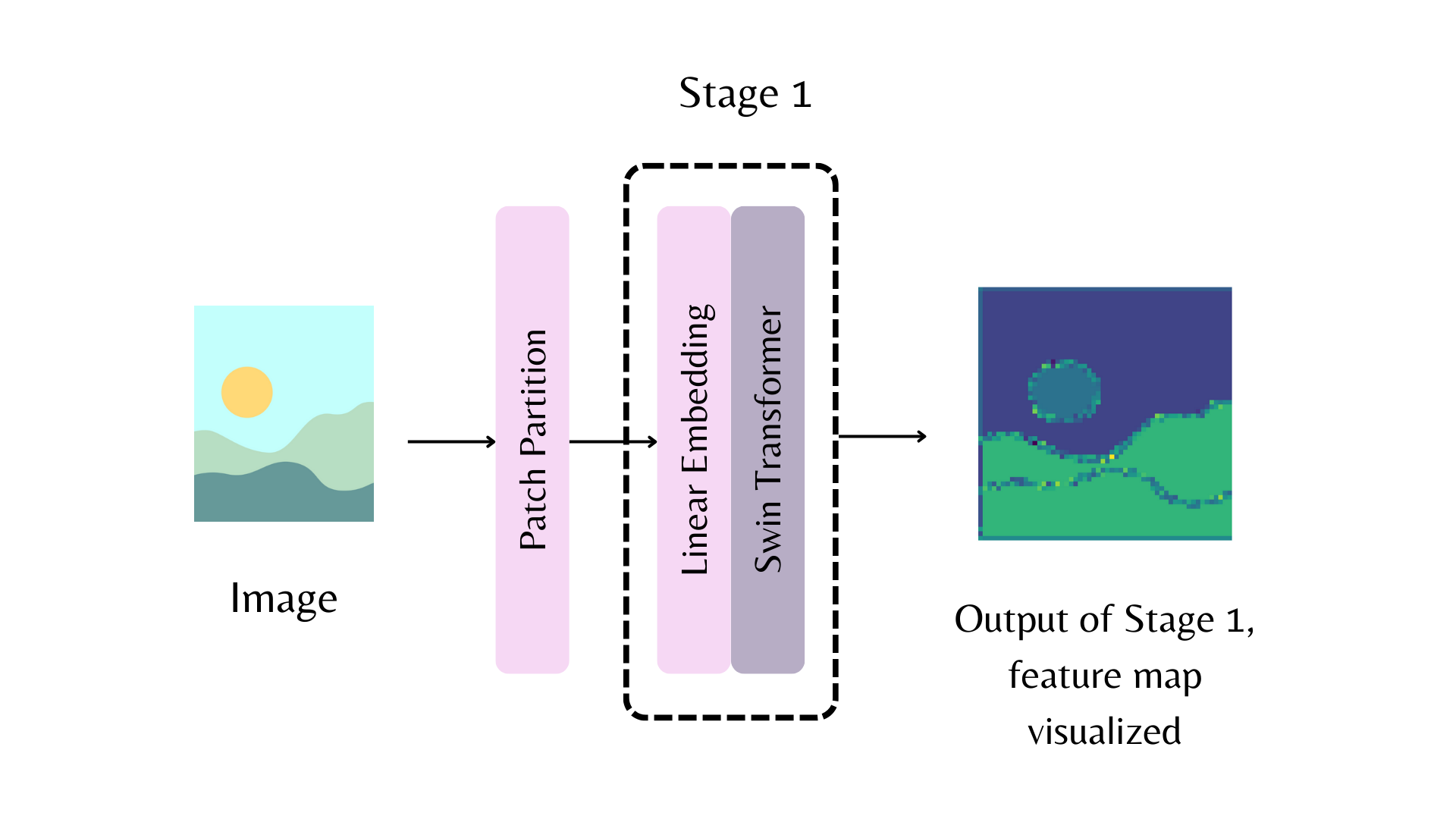
from transformers import AutoImageProcessor, AutoBackbone

model = AutoBackbone.from_pretrained("microsoft/swin-tiny-patch4-window7-224", out_indices=(1,))
When you know a model supports a backbone, you can load the backbone and neck directly into the models configuration. Pass the configuration to the model to initialize it for a task.
The example below loads a ResNet backbone and neck for use in a MaskFormer instance segmentation head.
Note that initializing from config will create the model with random weights. If you want to load a pretrained model, use from_pretrained API.
from transformers import MaskFormerConfig, MaskFormerForInstanceSegmentation

backbone_config = AutoConfig.from_pretrained("microsoft/resnet-50")
config = MaskFormerConfig(backbone_config=backbone_config)
model = MaskFormerForInstanceSegmentation(config)
Another option is to separately load the backbone configuration and then pass it to backbone_config in the model configuration.
from transformers import MaskFormerConfig, MaskFormerForInstanceSegmentation, ResNetConfig

# instantiate backbone configuration
backbone_config = ResNetConfig()
# load backbone in model
config = MaskFormerConfig(backbone_config=backbone_config)
# attach backbone to model head
model = MaskFormerForInstanceSegmentation(config)
timm backbones
timm is a collection of vision models for training and inference. Transformers supports timm models as backbones with the [TimmBackbone] and [TimmBackboneConfig] classes. Set the necessary backbone checkpoint in backbone to create a model with Timm backbone with randomly initialized weights.
from transformers import MaskFormerConfig, MaskFormerForInstanceSegmentation

backbone_config = TimmBackboneConfig(backbone="resnet50", out_indices=[-1])
config = MaskFormerConfig(backbone_config=backbone_config)
model = MaskFormerForInstanceSegmentation(config)
You could also explicitly call the [TimmBackboneConfig] class to load and create a pretrained timm backbone.
from transformers import TimmBackboneConfig

backbone_config = TimmBackboneConfig("resnet50")
Pass the backbone configuration to the model configuration and instantiate the model head, [MaskFormerForInstanceSegmentation], with the backbone.
from transformers import MaskFormerConfig, MaskFormerForInstanceSegmentation

config = MaskFormerConfig(backbone_config=backbone_config)
model = MaskFormerForInstanceSegmentation(config)
Feature extraction
The backbone is used to extract image features. Pass an image through the backbone to get the feature maps.
Load and preprocess an image and pass it to the backbone. The example below extracts the feature maps from the first layer.
from transformers import AutoImageProcessor, AutoBackbone
import torch
from PIL import Image
import requests

model = AutoBackbone.from_pretrained("microsoft/swin-tiny-patch4-window7-224", out_indices=(1,))
processor = AutoImageProcessor.from_pretrained("microsoft/swin-tiny-patch4-window7-224")

url = "http://images.cocodataset.org/val2017/000000039769.jpg"
image = Image.open(requests.get(url, stream=True).raw)

inputs = processor(image, return_tensors="pt")
outputs = model(**inputs)
The features are stored and accessed from the outputs feature_maps attribute.
feature_maps = outputs.feature_maps
list(feature_maps[0].shape)
[1, 96, 56, 56]